Glassmorphism NEON LIQUID Effect for Photoshop: A Complete Guide to Creating Stunning Designs
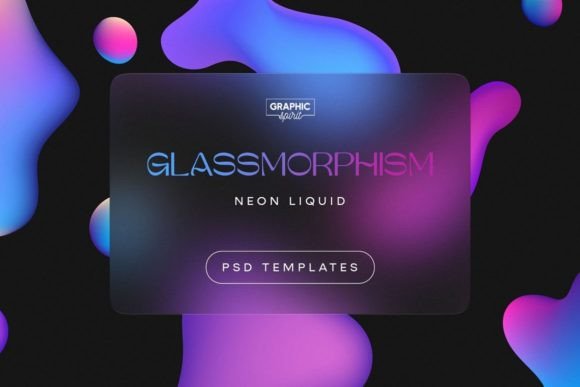
Glassmorphism has taken the design world by storm, offering a sleek and modern aesthetic that blends transparency, blur, and depth into visually appealing interfaces. When combined with the NEON LIQUID effect, it creates a striking visual that's perfect for websites, social media posts, posters, and more. This article will guide you through everything you need to know about creating the Glassmorphism NEON LIQUID effect in Adobe Photoshop using a PSD template with smart layers, preset parameters, and abstract shapes on the background.
What is Glassmorphism?
Glassmorphism is a design trend that mimics the look of frosted glass, where elements are semi-transparent and blurred. It was first popularized by Apple’s iOS 14 design language and has since become a staple in modern UI/UX design. The key characteristics of Glassmorphism include:
- Semi-transparency
- Blur effects
- Subtle shadows
- Minimalist design
When paired with the NEON LIQUID effect, which adds vibrant neon colors and fluid motion, the result is a dynamic and eye-catching design that stands out from traditional flat or skeuomorphic designs.
Why Use the Glassmorphism NEON LIQUID Effect?
The combination of Glassmorphism and the NEON LIQUID effect offers several benefits for designers:
- Versatility: It can be used across various platforms like websites, social media, mobile apps, and printed materials.
- Visual Appeal: The neon liquid effect adds energy and movement, making your designs more engaging.
- Modern Aesthetic: It aligns with current design trends, ensuring your work looks up-to-date and professional.
- Customization: With smart layers and preset parameters, you can easily tweak the design without starting from scratch.
Whether you're designing a website header, a social media post, or a business card, this effect gives your projects a unique and futuristic feel.
Getting Started with the Glassmorphism NEON LIQUID PSD Template
The Glassmorphism NEON LIQUID PSD template comes with three pre-made formats—horizontal, square, and vertical—each tailored for different uses. Here’s what you’ll get:
- User Guide.pdf: Step-by-step instructions on how to use the template effectively.
- Fonts.pdf: A list of 8 free fonts that match the style, along with direct download links to save you time.
- Horizontal.psd (4096x2160 px): Ideal for website banners or social media covers.
- Square.psd (2604x2604 px): Perfect for Instagram posts, logos, or app icons.
- Vertical.psd (2160x4096 px): Great for mobile app screens or poster designs.
- Demo Video: A quick walkthrough of the template in action.
All templates are built with smart layers, allowing you to edit individual elements without affecting the rest of the design. You can also replace the background with any image of your choice, giving you complete creative freedom.
How to Customize Your Design
Customizing the Glassmorphism NEON LIQUID effect is simple thanks to the smart layers and preset parameters included in the template. Here’s how you can personalize your design:
- Open the PSD file in Adobe Photoshop: Make sure you have the latest version of Photoshop installed.
- Adjust the Neon Liquid Effect: Use the layer styles panel to modify the color, intensity, and blur of the neon liquid effect.
- Edit Abstract Shapes: The background includes abstract shapes that can be resized, recolored, or replaced with other graphics.
- Change Fonts: Refer to the Fonts.pdf file for free font downloads. Once downloaded, apply them to your text layers.
- Replace Background Images: Simply drag and drop your preferred image into the background layer and adjust the blending mode if needed.
With these steps, you can quickly create a unique design that fits your project’s needs, whether it’s for a personal blog, a brand identity, or a promotional campaign.
Practical Applications of the Glassmorphism NEON LIQUID Effect
The versatility of the Glassmorphism NEON LIQUID effect makes it suitable for a wide range of applications:
- Websites: Use it for hero sections, buttons, or call-to-action areas to create an immersive experience.
- Social Media: Design eye-catching posts for Instagram, Facebook, or Twitter with this vibrant effect.
- Print Materials: Incorporate it into posters, flyers, or business cards for a modern and professional look.
- Mobile Apps: Enhance user interfaces with subtle neon accents and transparent overlays.
- Presentations: Add a futuristic touch to slideshows or reports with this stylish effect.
No matter the medium, the Glassmorphism NEON LIQUID effect ensures your designs stand out and capture attention.
Common Misconceptions About Glassmorphism
While Glassmorphism is a popular trend, there are some misconceptions that can lead to misuse or misunderstanding. Here are a few things to keep in mind:
- It’s Not Just for Tech Products: Although often seen in tech interfaces, it can be applied to any design that benefits from a modern, minimalist look.
- It Doesn’t Have to Be Overdone: Too much blur or transparency can make your design appear cluttered. Use it sparingly for best results.
- It Works Well with Dark Themes: Combining Glassmorphism with dark backgrounds can enhance contrast and make the neon effect pop even more.
By understanding these nuances, you can use the Glassmorphism NEON LIQUID effect effectively without falling into common design pitfalls.
Conclusion
The Glassmorphism NEON LIQUID effect is a powerful tool for designers looking to create modern, eye-catching visuals. With the provided PSD template, you can easily customize your designs using smart layers, preset parameters, and abstract shapes. Whether you're working on digital or print projects, this effect offers a versatile and stylish solution that aligns with current design trends.
By following the User Guide and exploring the included fonts and demo video, you'll be able to unlock the full potential of this effect and elevate your creative work to new heights. Start experimenting today and see how the Glassmorphism NEON LIQUID effect can transform your designs!